
Spec-Driven Development with spec-kit: Stop Vibe Coding, Start Specifying
Most AI coding sessions start the same way. You open your editor, type a rough idea into the chat, and watch the agent generate files. It feels productive. Then two hours later you are reviewing code that solves a problem you never quite specified, built on assumptions the agent made silently, in a style that does not match the rest of your project.
This is vibe coding — and it does not scale.
spec-kit is GitHub’s answer to that problem. It installs a pipeline of slash commands into your AI coding agent that forces structure before implementation: write a spec, produce a plan, generate tasks, then implement. This tutorial walks through the complete workflow using a real feature addition to a live project.
1. The Problem: Vibe Coding at Scale
Vibe coding is the practice of jumping straight to implementation with an AI agent, using a rough prompt as the only specification. For throwaway scripts it works fine. For real features on real codebases, it produces four predictable failure modes.
Inconsistent architecture. The agent picks a pattern that seemed reasonable from the context it read. It may not be the pattern your project uses everywhere else. You end up with two ways of doing the same thing.
Hallucinated requirements. Agents fill gaps. When you say “add issue type support,” the agent decides what that means: fixed list or dynamic fetch, batch-level or per-item, what to do when Jira rejects the type. It guesses. Sometimes it guesses well. Often the guesses create edge cases nobody planned for.
No shared understanding. When a teammate reads the PR, they see code. They do not see the decisions that produced it. Was “Epic” intentionally excluded? Is the four-item list a business decision or a prototype? The code does not answer those questions.
Rework. The most expensive failure mode. You implement, review, discover the feature does not match what the stakeholder wanted, and start over. A five-minute spec conversation would have caught it.
The alternative is to make the specification the first deliverable — not the code.
2. What Is Spec-Driven Development?
Spec-driven development treats the specification as the source of truth that all downstream artifacts derive from. The code is an implementation detail. The spec is the contract.
The pipeline has five phases:
- Constitution — establish governing principles for the project (once, not per feature)
- Specify — translate a user description into user stories, acceptance scenarios, functional requirements, and success criteria
- Plan — translate the spec into a technical design: gap analysis, data model, API contracts, implementation map
- Tasks — decompose the plan into a flat, ordered, independently implementable task list
- Implement — execute the tasks with the AI agent
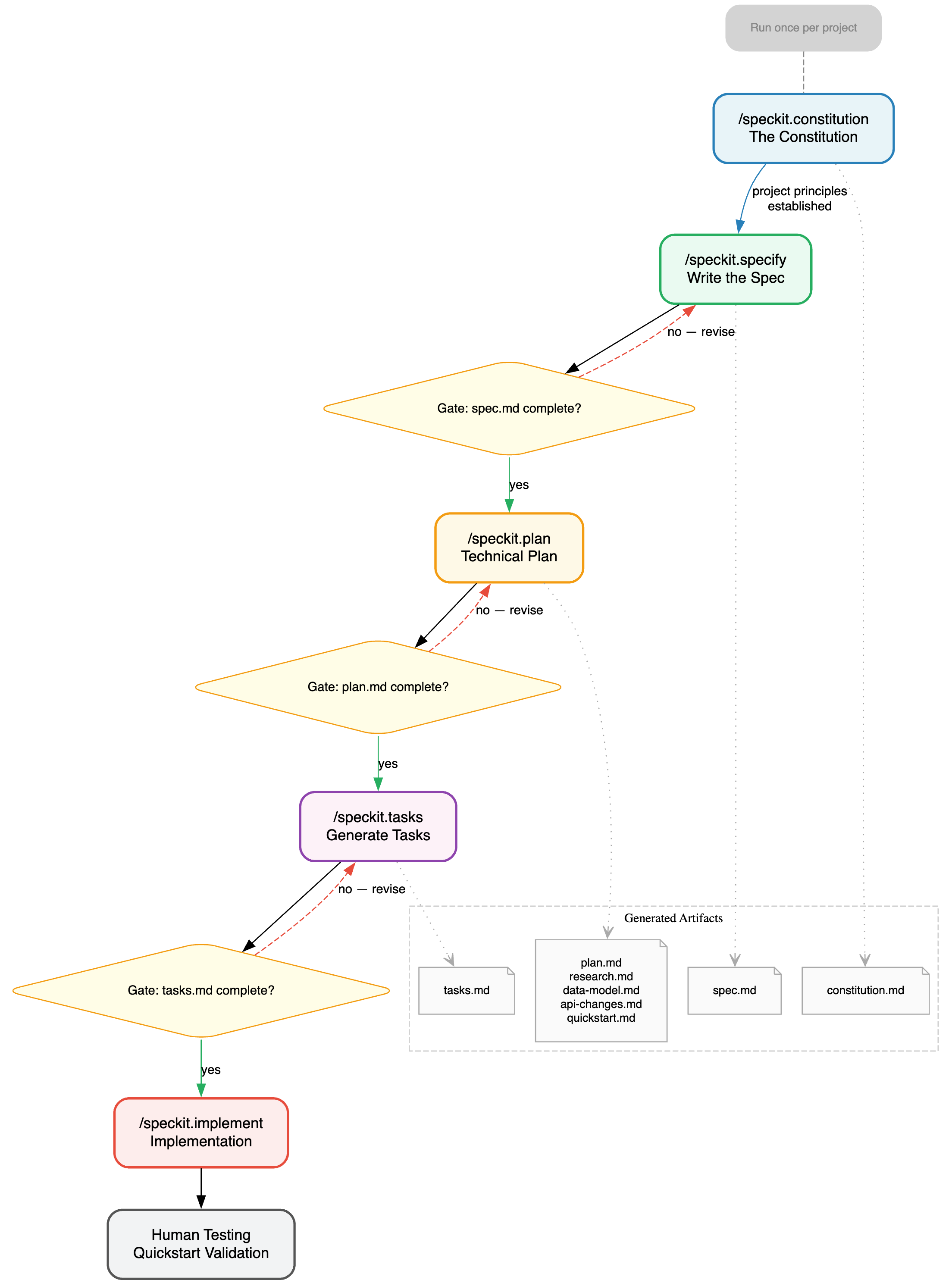
Each phase gates the next. You cannot generate tasks without a plan. You cannot write a plan without a spec. The pipeline enforces the discipline so you do not have to.
The key insight is that specifications and plans are different things. A spec describes what the user needs in user-value terms: no technology, no implementation, no assumptions. A plan describes how to build it: languages, files, patterns, migrations. Keeping them separate prevents the common failure where “spec writing” turns into “architecture discussion” before you have agreed on what the user actually wants.
3. Introducing spec-kit
spec-kit is an open-source CLI from GitHub that implements this pipeline as slash commands for your AI coding agent.
You install it once. It installs five slash commands — speckit.constitution, speckit.specify, speckit.plan, speckit.tasks, speckit.implement — directly into your agent’s configuration. After that, you run the pipeline from inside your normal coding session. No context switch, no separate tool.
spec-kit supports 18+ agents including Claude Code, GitHub Copilot, Cursor, Windsurf, Zed, and Cline. The commands work the same regardless of which agent you use because they install as agent-agnostic slash command definitions.
The agent does the work. spec-kit provides the structure: templates, scripts, and quality checklists that the agent reads, fills in, and validates. The output is a set of markdown files in a specs/ directory that become the permanent record of every feature decision.
4. Installation
Prerequisites: Python 3.11+, UV, Git, and any supported AI coding agent.
spec-kit provides two install modes.
Persistent install — adds specify to your PATH so you can use it in any project:
uv tool install specify-cli --from git+https://github.com/github/spec-kit.git
One-time install — runs without installing permanently, useful for trying it out:
uvx --from git+https://github.com/github/spec-kit.git specify init
Once installed, run specify init inside your project directory:
cd your-project
specify init
This creates a .specify/ directory in your project root containing scripts, templates, and agent configuration. It also registers the slash commands with your installed AI agents. From this point on, /speckit.specify, /speckit.plan, and the rest are available in your coding session.
5. The Workflow: A Real Example
The following walkthrough uses a real session: adding Jira issue type selection to ai-agents-actions-tracker, a tool that extracts action items from meeting transcripts and pushes them to Jira. The existing system always created tickets as “Task.” The feature request was to support Bug, Story, and Epic as well.
All terminal excerpts are condensed from the actual session output.
Step 1 — The Constitution (/speckit.constitution)
The Constitution is a one-time setup command that documents the governing principles for your project: architectural patterns, technology decisions, security requirements, and constraints that every feature must respect.
You run it once when you set up spec-kit. For ai-agents-actions-tracker it captured five principles: web-app architecture (Route → Service → Model), AI-augmented but not AI-dependent, data integrity with migration discipline, security and multi-tenant safety, and simplicity with independent testability.
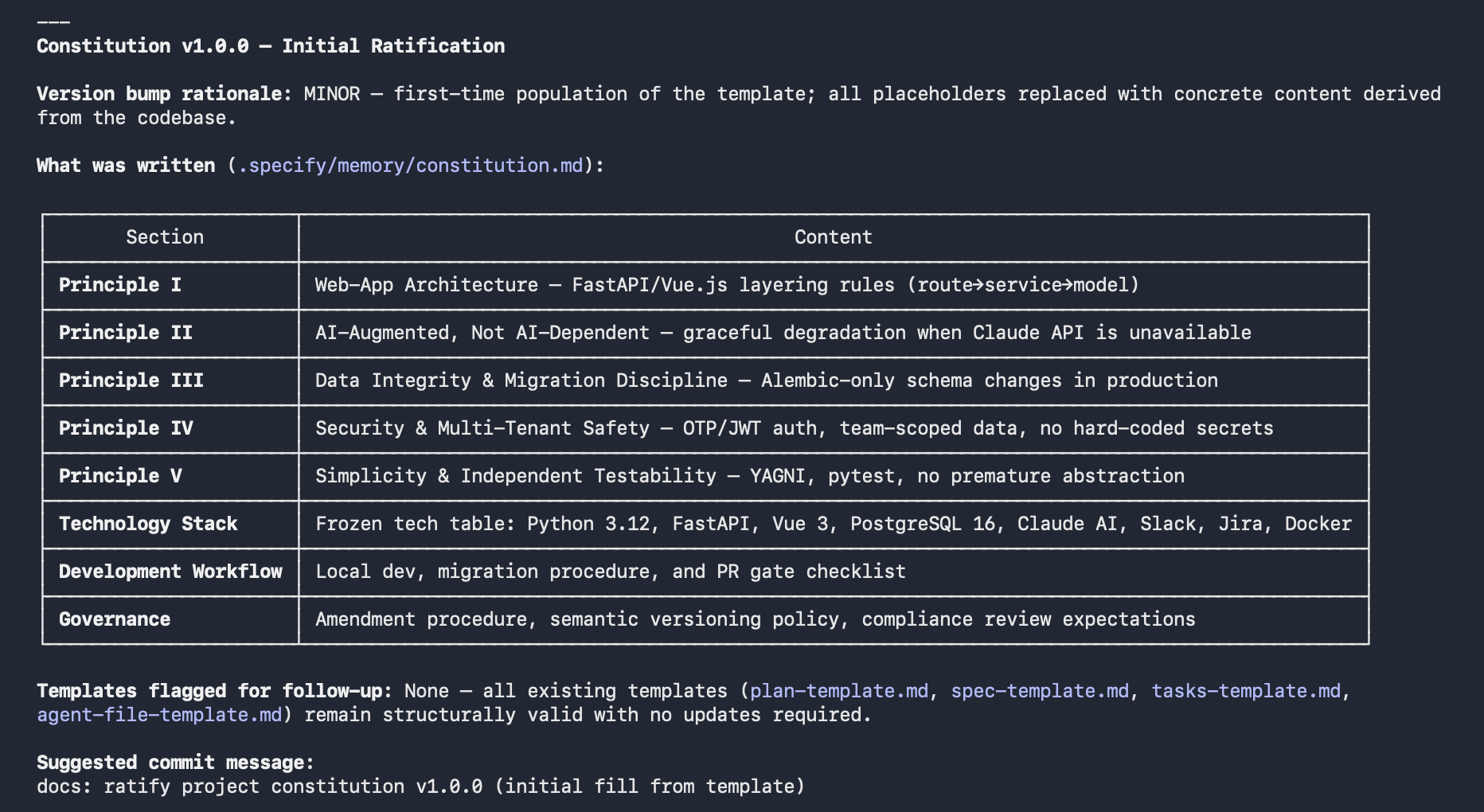
Every subsequent plan generates a Constitution Check — a gate that verifies the feature design does not violate these principles. This prevents architectural drift across features without requiring a human reviewer to remember every past decision.
Step 2 — Write the Spec (/speckit.specify)
You provide the feature description as an argument:
/speckit.specify The current system always creates only a task, support for
creating more issue types like Bug, Story and Epic
spec-kit takes that sentence and does the following automatically:
- Creates a git branch (
001-jira-issue-types) - Researches the current codebase to understand the existing Jira integration
- Writes a
specs/001-jira-issue-types/spec.mdwith user stories, acceptance scenarios, edge cases, functional requirements, key entities, and success criteria - Runs a quality checklist to validate completeness
The output is a two-story spec with no clarifications needed:
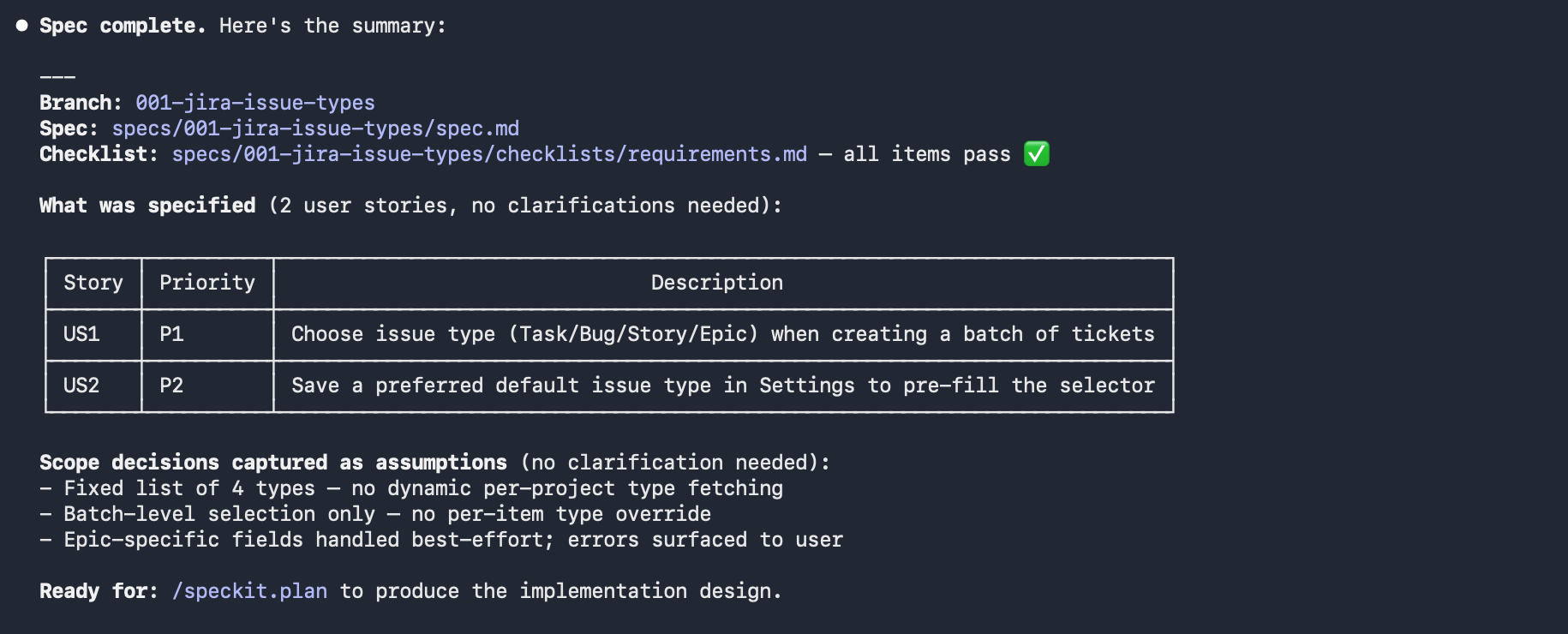
The spec also captures scope decisions as explicit assumptions so they do not become implicit debate later:
- Four types only — no dynamic fetching of supported types per Jira project
- Batch-level selection — no per-item type override
- Epic-specific required fields handled best-effort; Jira rejections surfaced to user
Notice what is not in the spec: no mention of Vue components, no mention of FastAPI, no mention of how the default is stored. Those belong in the plan.
Step 3 — Plan (/speckit.plan)
/speckit.plan
The plan command reads spec.md, researches the codebase in depth, and produces a complete technical design. It also runs the Constitution Check before generating anything.
The gap analysis is the most valuable output — it documents exactly what already exists versus what is missing:
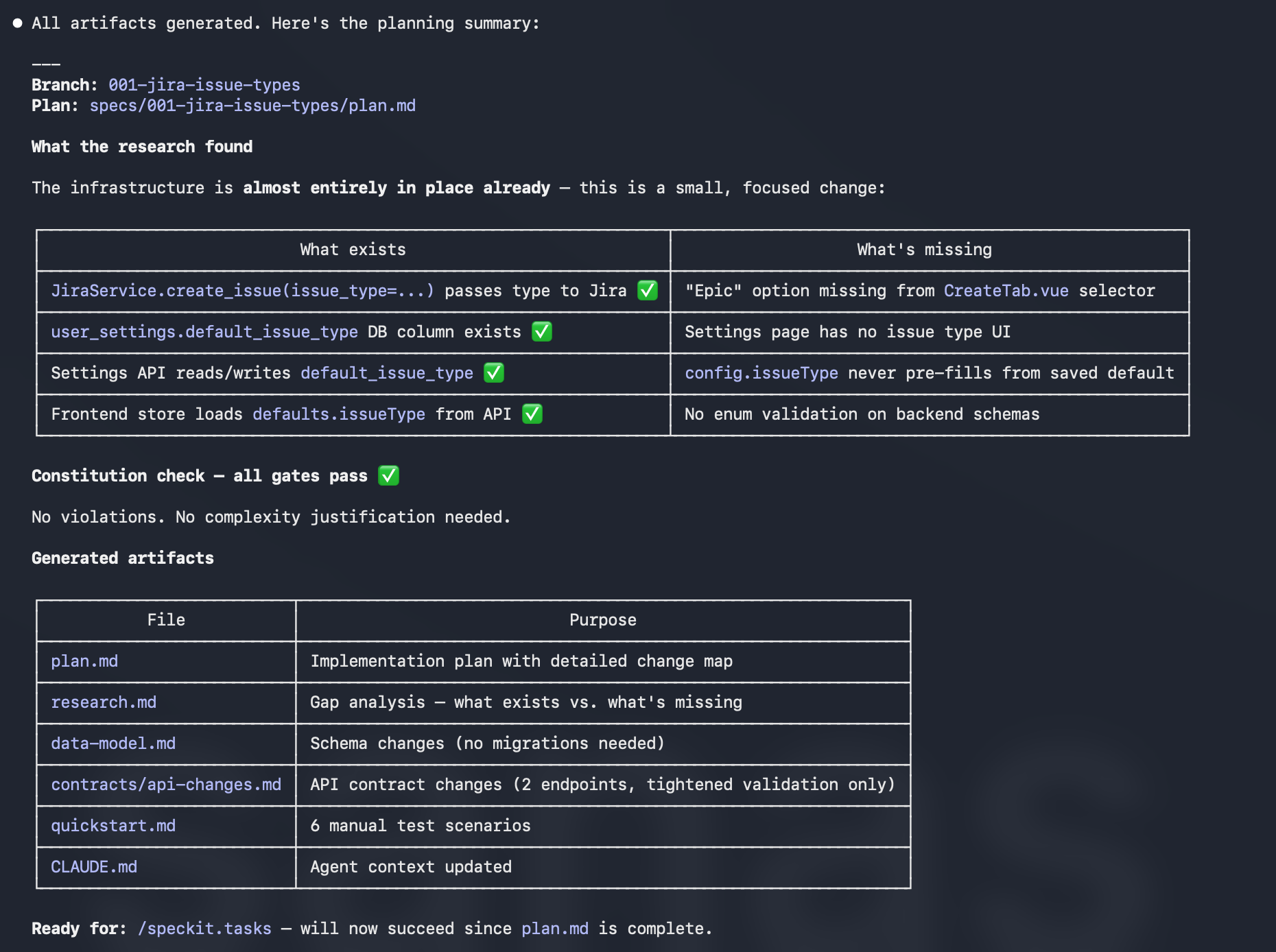
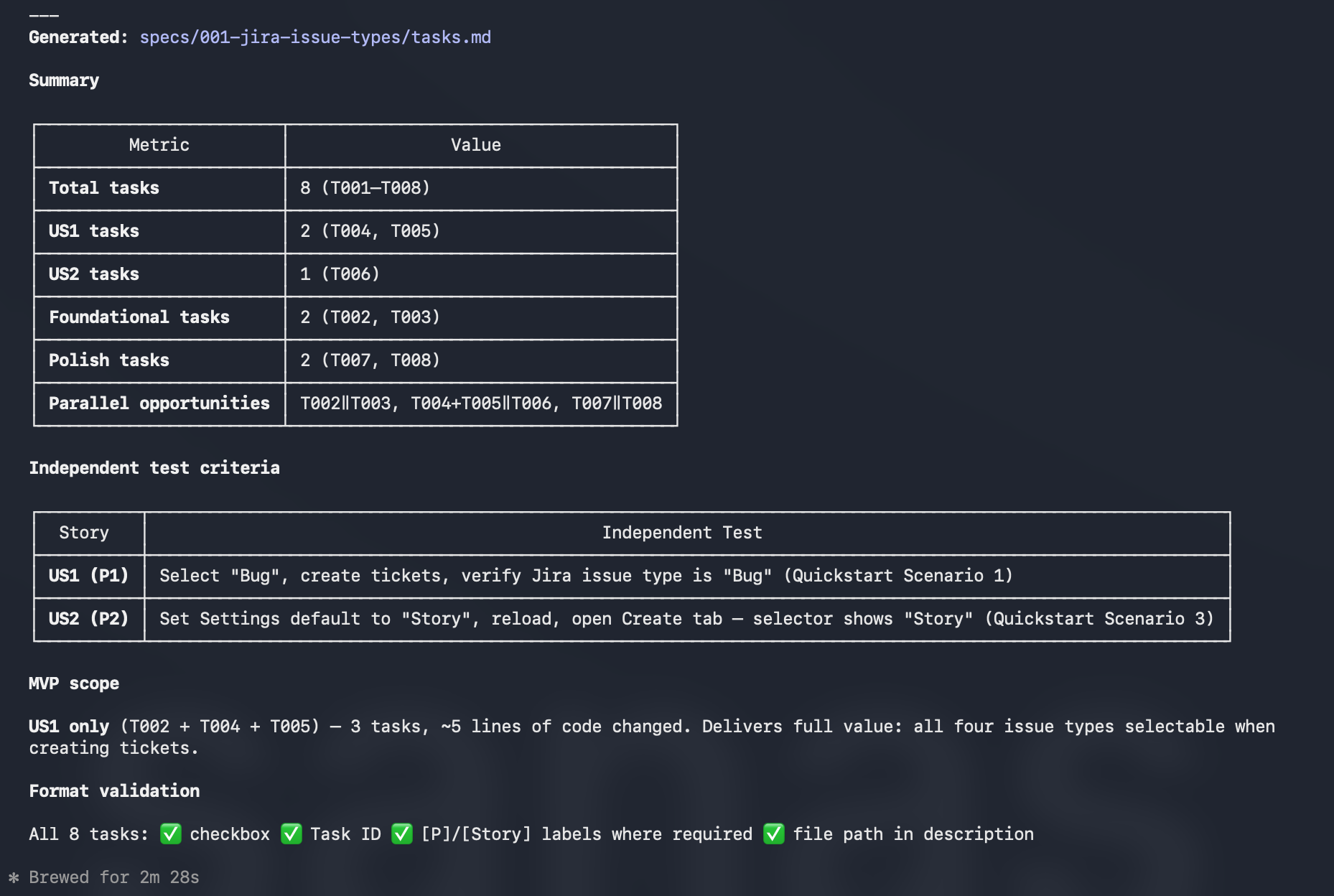
The plan concluded that this feature required changes to five files and approximately 30 lines of code. No new endpoints, no new DB columns, no new services. The infrastructure was already in place.
Step 4 — Generate Tasks (/speckit.tasks)
/speckit.tasks
The tasks command reads all the planning artifacts and generates a flat, ordered, independently implementable task list. If you try to run it without a completed plan.md, it fails with a clear error — this is the gate system in action.
With the plan in place, it produced eight tasks:
Step 5 — Implement (/speckit.implement)
/speckit.implement
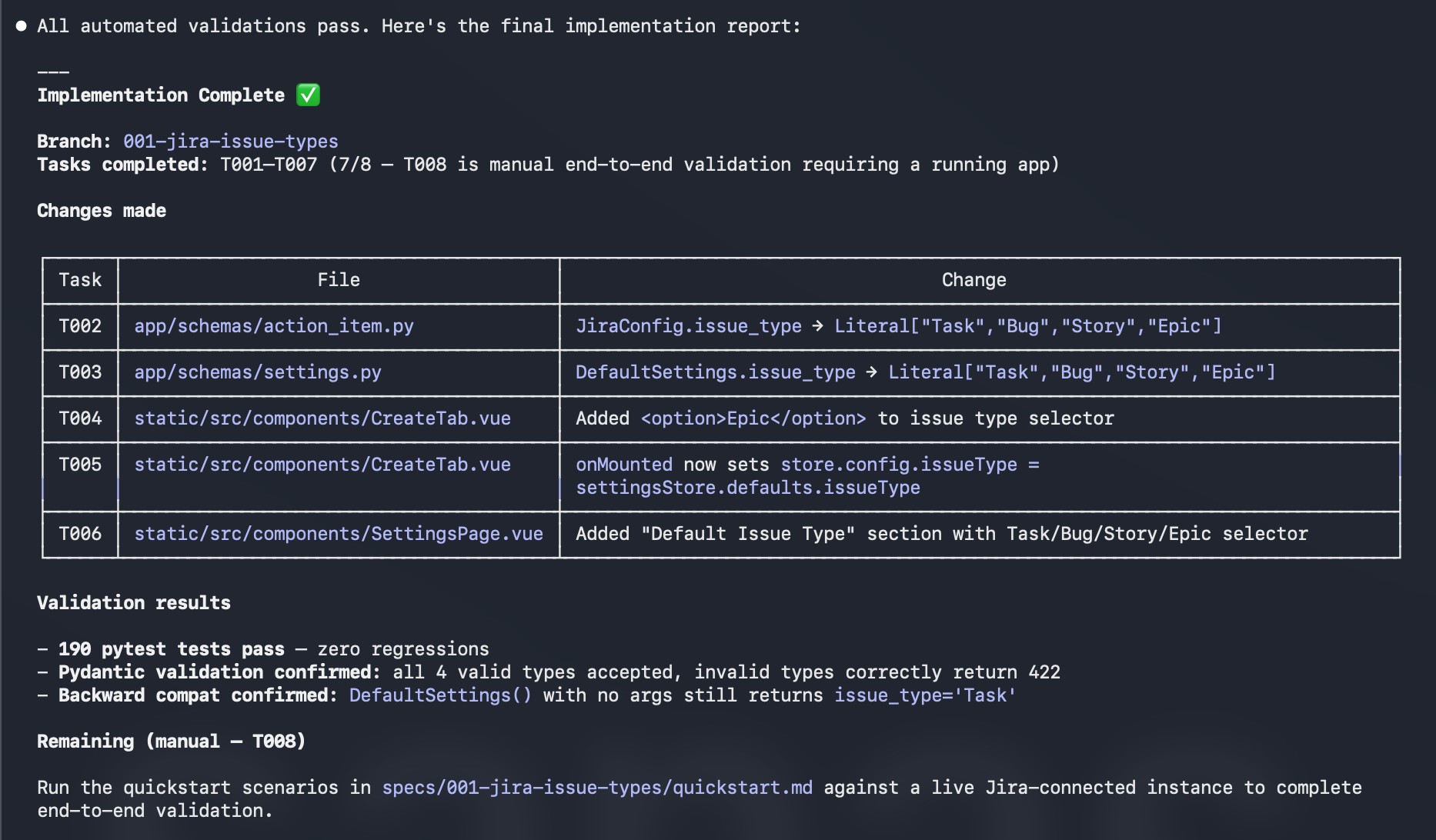
The implement command hands control to the AI agent with the complete context: spec, plan, research, data model, API contracts, and the ordered task list. The agent works through the tasks in sequence, marking each complete before moving to the next.
Because every decision was made upfront, the implementation phase produces no surprises. The agent does not need to guess what “Epic” support means. It does not need to decide whether to add a DB migration. It does not need to choose between batch-level and per-item selection. All of that is resolved. The agent just writes code.
6. Key Concepts Explained
The Constitution is project memory. It captures decisions that span features: how the project is architected, what constraints exist, what patterns are standard. Every plan runs a Constitution Check against it. Without the Constitution, each feature is written in isolation and architectural drift accumulates silently.
Spec vs. Plan is the most important separation in the workflow. The spec is a user-value document — it describes what users need, written in language any stakeholder can read, with no mention of implementation. The plan is a technical document — it describes exactly which files change, what the data model looks like, and what the API contract is. Merging them produces a document that is both too technical for stakeholders and too vague for developers.
The Gate System is what makes the pipeline work. Tasks require a plan. A plan requires a spec. You cannot skip steps by design. This is not bureaucracy — it is the same principle as a compiler refusing to link code that has not been compiled. Each phase validates the previous phase’s output before generating the next. The checklist artifacts (in specs/*/checklists/) are the validation mechanism.
Assumptions as first-class citizens. The spec explicitly lists what is out of scope and what is assumed. In the example: dynamic fetching of issue types per Jira project is out of scope; Epic-specific required fields are handled best-effort. Writing assumptions down prevents them from becoming unspoken constraints that surprise the next person who works on the feature.
7. What spec-kit Produces
After running the full pipeline, your specs/ directory contains:
specs/001-jira-issue-types/
├── spec.md                  # User stories, acceptance scenarios, FRs, success criteria
├── plan.md                  # Technical design, gap analysis, change map, Constitution Check
├── research.md              # Codebase research — what exists vs. what's missing
├── data-model.md            # Schema changes and entity definitions
├── quickstart.md            # Manual test scenarios for end-to-end validation
├── tasks.md                 # Ordered, independently implementable task list (T001–T008)
└── contracts/
    └── api-changes.md       # API contract changes with request/response schemas
These files are committed to the repository alongside the code. They answer every future question about why the feature works the way it does, what was considered and rejected, and what the explicit assumptions were. They are also input for the next feature that builds on this one.
8. When to Use Spec-Driven Development
Good fit:
- New features where requirements are not fully defined
- Ambiguous requests where the AI agent would need to make multiple judgment calls
- Team collaboration where multiple people need to agree on what is being built
- Features that touch multiple parts of the codebase
- Anything where rework would be expensive
Less useful:
- Hotfixes where the bug and the fix are both obvious
- Pure refactors where the behavior is not changing
- Exploratory prototypes where the goal is to discover requirements, not implement them
- One-off scripts with no future maintenance expectations
Rule of thumb: if you would need to answer more than one clarifying question before the AI agent could start implementing, write a spec first. The spec is that conversation, made permanent.
The spec writing step in the real example took under three minutes of terminal time (two minutes and twenty-five seconds according to the session output). The plan step took under four minutes. The entire pipeline produced eight clear tasks with parallel opportunities identified. Compare that to the alternative: discovering mid-implementation that “Epic” support requires a mandatory Epic Name field that Jira rejects if missing.
9. References and Further Reading
- spec-kit on GitHub: https://github.com/github/spec-kit
- Supported AI agents: Claude Code, GitHub Copilot (VS Code, JetBrains), Cursor, Windsurf, Zed, Cline, Goose, Aider, Continue, and more — see the repo README for the full list
- UV installer: https://docs.astral.sh/uv/ — required for the
uvxone-time install mode
The spec-kit repository also contains the Constitution template, all slash command definitions, and the scripts that back each pipeline step — worth reading if you want to understand what the commands are actually doing or adapt them for a different workflow.